

Setting Up Account Linking via Microdeposits
This guide explains how to create and manage links to external accounts via microdeposits. Before performing this procedure, see the Account Linking via Microdeposits guide for general information on the user experience and use cases.
Result of following this procedure
An account holder links an external account that they own to an account they hold with you, as the result of verifying small ACH deposit amounts in their external bank account.
Prerequisites
- You must be using SoFi Tech Solutions to handle your ACH transactions.
- If you were using legacy ACH endpoints from SoFi Tech Solutions, you'll need to work with us to have your system call the new account-linking endpoints: Create External Account Link and Validate External Account Link. The steps below illustrate how your system should use these endpoints.
- SoFi Tech Solutions must perform some setup steps on the back end to enable this feature to work with your system.
- You must determine the validation window, which is the timeframe within which the user needs to confirm the amounts of the microdeposits. By default, users have 12 days to validate microdeposit amounts, but you can specify a different number of days during onboarding. If a user does not correctly validate the microdeposits before this expiration date, the external account is marked invalid for ACH money movement.
Workflow
These are the entities involved in setting up Account Linking via Microdeposits:
- Account holder — Your customer, who has at least one account on your platform
- Your system — Your mobile app or web page, which has a control to launch the account-linking process
- SoFi Tech Solutions — The system that orchestrates the microdeposit process.
- ACH Operator — The entity that clears and settles ACH transactions
- External bank — Houses the account holder's external bank account
Use the following diagram and corresponding steps to understand how to implement Account Linking via Microdeposits.
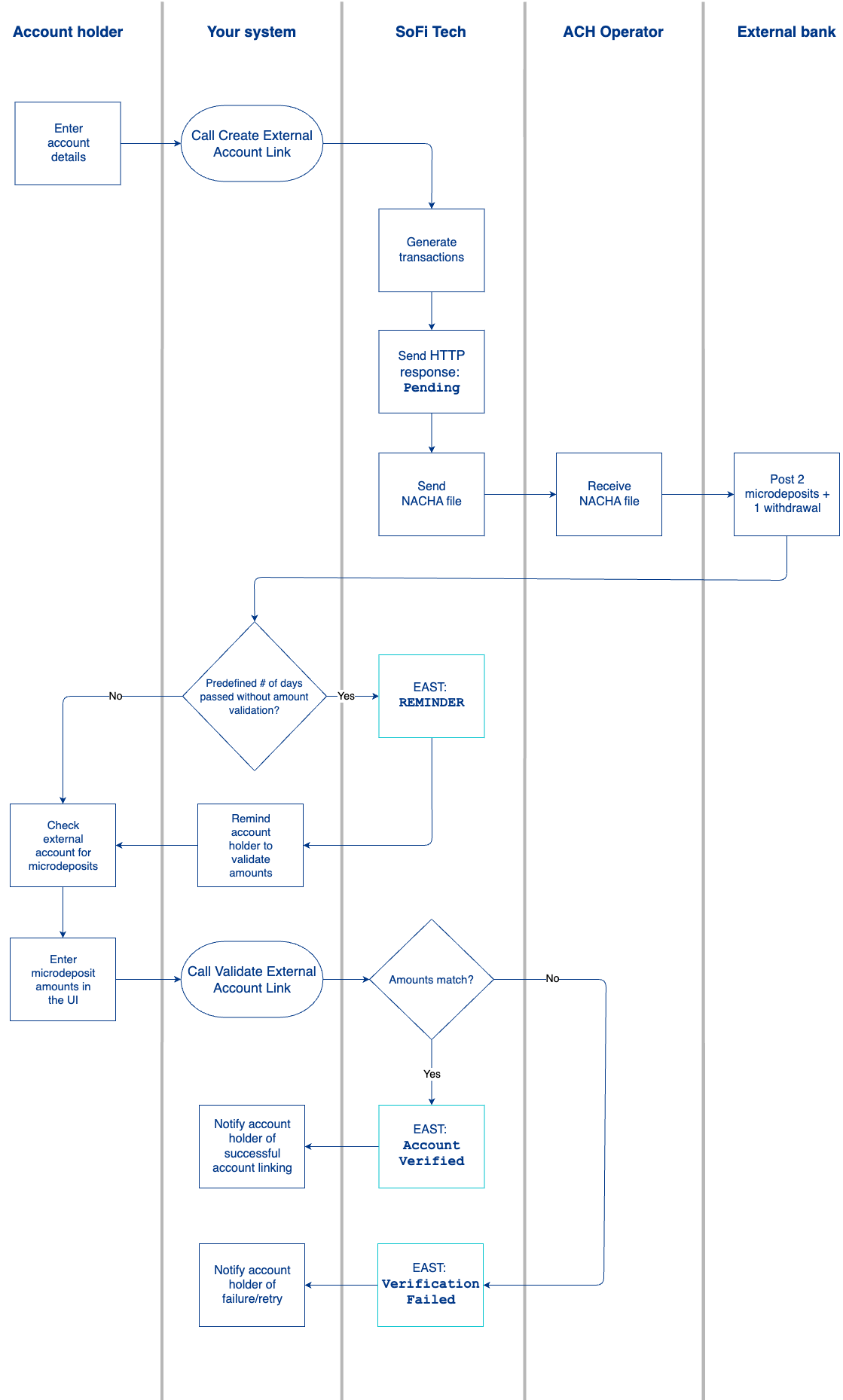
- The account holder manually enters their account and routing number into your system to begin the linking process.
- You call the Create External Account Link endpoint with these values:
accountNo— PRN of the account on your platform.bankRoutingInfo— Routing number for the account holder's bank.validationobject, fortype—MICRO_ENTRY
- SoFi Tech Solutions generates two microdeposit transactions plus one withdrawal totaling the sum of the two microdeposits. For example, if the two microdeposits are $0.10 and $0.25, the withdrawal would be $0.35.
- SoFi Tech Solutions sends your system an HTTP response to communicate a
Pendingstatus, and you notify the account holder that their account link is pending. - SoFi Tech Solutions sends the Nacha file containing the microdeposits.
- The ACH Operator receives the Nacha file for clearing and settlement.
- The account holder's external bank posts the two microdeposits and one withdrawal to their account. This can occur on the same day if Same-Day ACH is enabled; otherwise, this can take up to two business days.
- If the account holder hasn't verified the microdeposit amounts after a predefined period of time has passed:
- SoFi Tech Solutions sends an
EAST: external_account_status_changewebhook to your system withstatus_reason: REMINDER. - Your system reminds the customer to check their account.
- SoFi Tech Solutions sends an
- The account holder checks their external bank account for the two microdeposit amounts.
- The account holder inputs the microdeposit amounts in your system.
Your system calls Validate External Account Link with these reported microdeposit amounts asamount1andamount2. - SoFi Tech Solutions validates these amounts against the system of record. The order in which the account holder enters the two amounts does not matter.
- If the amounts match, SoFi Tech Solutions sends the
EAST: external_account_status_changeevent message again withstatus:ACTIVE. - If the amounts don't match, SoFi Tech Solutions sends the
EAST: external_account_status_changeevent message withstatus: FAILED.
- If the amounts match, SoFi Tech Solutions sends the
- You notify the customer of the result of the microdeposit verification. If verification fails, the account holder has 3 retry attempts.
Events API
During the external account link process, SoFi Tech Solutions sends the EAST: external_account_status_change event any time the status of the external account link changes.
Event fields for microdeposits
For microdeposit (MICRO_ENTRY) links, the EAST: external_account_status_change event includes these fields:
| Field | Example value | Description |
|---|---|---|
external_acct_link_id | 123e4567-e89b-12d3-a456-4266100532 | Unique identifier of the external account link. |
status | PENDING | Current link status. This remains PENDING until the account holder has entered the microdeposit amounts. |
details_type | BANK | Type of linked account details. For microdeposits, this is always BANK. |
validation_type | MICRO_ENTRY | Validation method for the link. For microdeposits, this is always MICRO_ENTRY. |
status_reason | REMINDER | Reason for this notification. For microdeposit reminders, the value will be REMINDER, but can be other reasons depending on the status change. |
Status values
Within this event, the possible values for status are:
PENDING— The link to the external account is being established. Correct microdeposit validation amounts have not been received.ACTIVE— The link to the external account has been successfully set up.FAILED— The link to the external account process failed.DELETED— The link to the external account has been removed. This only happens as a result of a Delete External Account Link endpoint call.
FAILED status
FAILED statusWhen status:FAILED, the status_reason will show one of the following reasons:
NO_ATTEMPTS_LEFT— User exhausted max validation attempts with wrong amounts.EXPIRED— Validation window (expiration_days) elapsed with no successful validation.ACH_RETURNED— A microdeposit credit was returned.ORIGINATION_FAILED— Deposits never confirmed as originated by the end of the grace period.Unable to validate the account— Fallback whenvalidation.status_reasonis empty.
Failure most commonly occurs due to one of the following conditions:
- Too many attempts — The validation failed three times.
- Validation mismatch — The account owner details provided by the link provider did not sufficiently match the customer information on file in the SoFi Tech Solutions system.
- Duplicate data — A duplicate external account already exists with the same banking details, or the same external account link ID exists with different banking details.
REMINDER status reason
REMINDER status reasonWhile the link is still PENDING, SoFi Tech Solutions can send an EAST: external_account_status_change event with status_reason: REMINDER if the account holder has not yet validated the microdeposit amounts in the configured reminder window.
The PENDING status signifies the link is still awaiting successful microdeposit validation. Use this event to prompt the account holder to check their external bank account and enter the two microdeposit amounts.
Updated about 1 hour ago