

Overdraft Workflows
Authorization with overdraft
This flowchart illustrates authorization and settlement for a card transaction that uses overdraft funds.
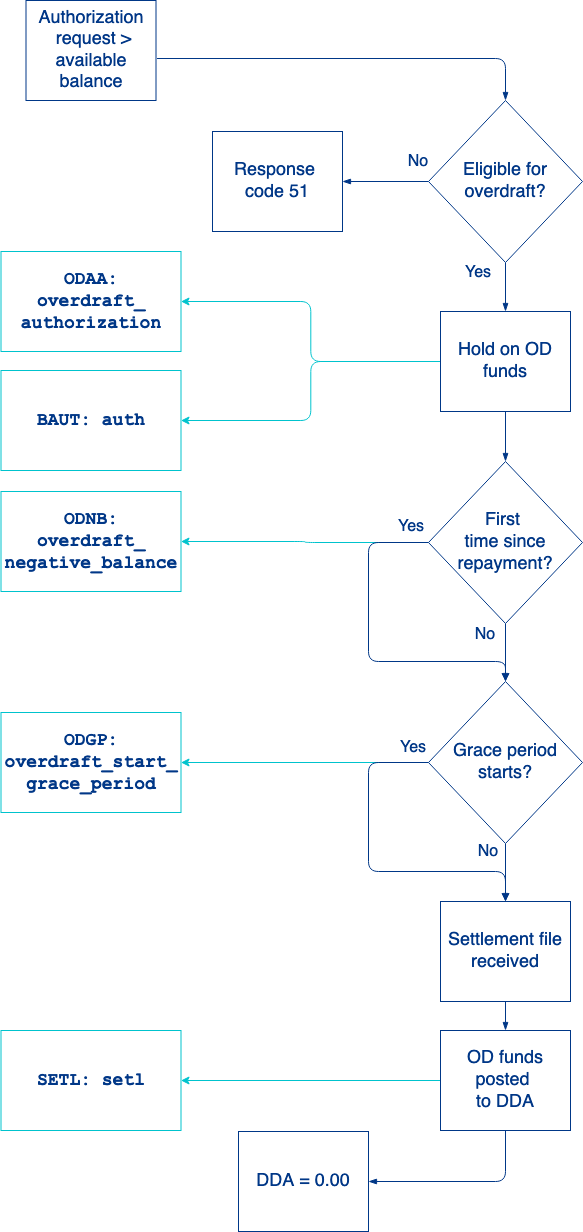
- An account holder makes a purchase over card network rails and the card network sends an authorization request. The spending account has insufficient funds to cover the purchase but the account is linked to an overdraft account.
- SoFi Tech Solutions determines whether the authorization request is eligible to draw from the overdraft account. Eligibility depends on whether the transaction is a qualifying purchase and if there are sufficient funds available in the overdraft account line of credit.
- Not eligible — SoFi Tech Solutions denies the authorization request and sends response code
51to the card network. - Eligible — SoFi Tech Solutions places a hold for the authorized amount on the overdraft account.
- SoFi Tech Solutions sends the
BAUT: authevent and theODAA: overdraft_authorizationevent. - If this is the first time a spending account has drawn on the overdraft account since the overdraft account was fully repaid, SoFi Tech Solutions sends the
ODNB: overdraft_negative_balanceevent. - If the authorization exceeds de minimis and triggers a grace period for fee repayment, SoFi Tech Solutions sends the
ODGP: overdraft_start_grace_periodevent.
- Not eligible — SoFi Tech Solutions denies the authorization request and sends response code
- The card network sends a settlement batch file.
- SoFi Tech Solutions backs out the authorization hold on the primary spending account and posts the overdraft funds to the primary account.
The balance to 0.00 if the authorization and settlement amount match. If there is a difference, the balance will reflect the difference. - SoFi Tech Solutions sends the
SETL: setlevent.
Overdraft fees
An overdraft fee is usually charged when a spending account, either the primary or secondary, draws from its overdraft account, with some exceptions. Your product configuration determines what account reflects the transaction hold (reserve) and which account is charged the fee:
- Fees on the overdraft account and reserve on overdraft account
- Fees on a spending account (DDA) but reserve on the overdraft account
- Fees on a spending account (DDA) and reserve on the overdraft account
This flowchart illustrates the process to determine when overdraft fees are charged to an account.
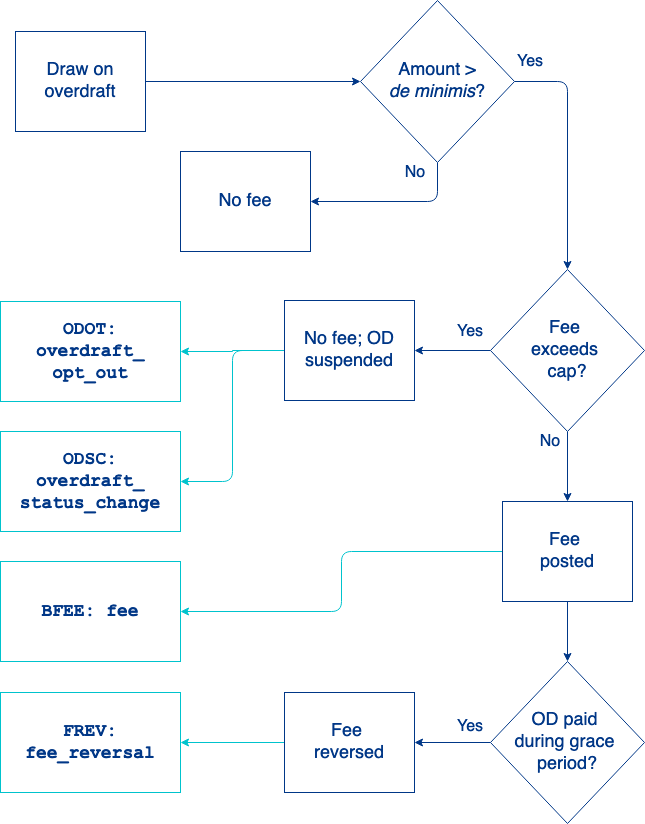
- An account holder makes a purchase with insufficient funds in the primary or secondary spending account. The spending account draws on its overdraft account.
- SoFi Tech Solutions determines if the amount owed to the overdraft account exceeds the de minimis threshold.
- Does not exceed — SoFi Tech Solutions does not post an overdraft fee.
- Exceeds — SoFi Tech Solutions determines whether the fee would exceed the fee cap:
- Does not exceed — SoFi Tech Solutions posts the overdraft fee when the transaction settles and sends the
BFEE: feeevent message. - Exceeds — SoFi Tech Solutions does not post the overdraft fee but starts the process to suspend the overdraft account. SoFi Tech Solutions sends the
ODOT: overdraft_opt_outand theODSC: overdraft_status_changeevent messages.
- If the overdraft amount is paid within the grace period, SoFi Tech Solutions reverses the overdraft fee and sends the
FREV: fee_reversalevent message.
NoteOverdraft fees do not trigger repayment. The DDA balance will remain negative until the overdraft amount is paid.
Overdraft line of credit
This flowchart illustrates the process to specific the overdraft line of credit at the account-level.
NoteExisting overdraft programs must request SoFi Tech Solutions to disable the automated credit limit process if you want to use Set Overdraft Limit.

- You call Set Overdraft Limit with these values:
overdraftAccountNo— overdraft account numberamount— credit limit amount
- SoFi Tech Solutions verifies that you requested the credit limit to be set on the overdraft account (
fet_id: 15) and the amount does not exceed the maximum credit limit set during configuration.
- If the account number provided is not an overdraft account the endpoint returns
status_code: 670-02. - If the requested limit exceeds the maximum limit the endpoint returns
status_code: 670-04.
- Overdraft credit limit is updated. Set Overdraft Limit response returns the
previous_overdraft_limitandnew_overdraft_limit. - SoFi Tech Solutions sends
ODCL: overdraft_credit_limit_changeto confirm the overdraft limit has changed.
Overdraft repayment
This flowchart illustrates the process to repay funds owed on an overdraft account.
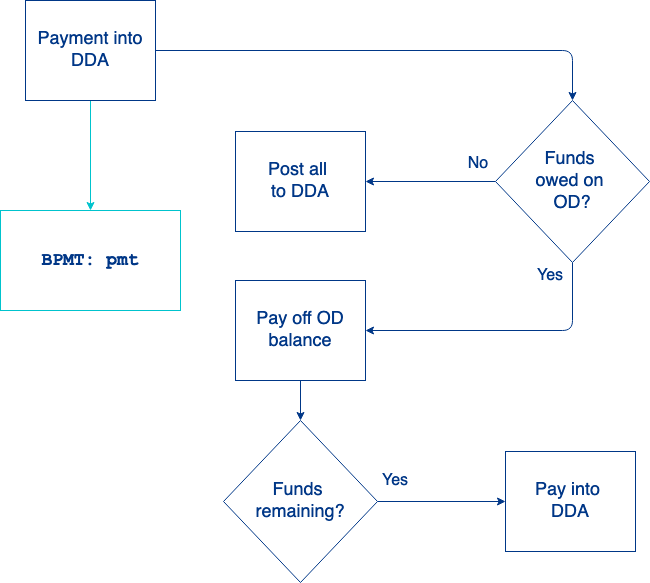
- A payment is made to a spending account.
- SoFi Tech Solutions sends the
BPMT: pmtevent. - If funds are not owed on the overdraft account, the full payment is posted to the primary account balance after any fees are paid.
- If funds are owed on the overdraft account once settlement occurs:
a. The payment is first posted to the overdraft balance.
b. The remaining amount is posted to the primary account after any fees are paid.
Charge-off
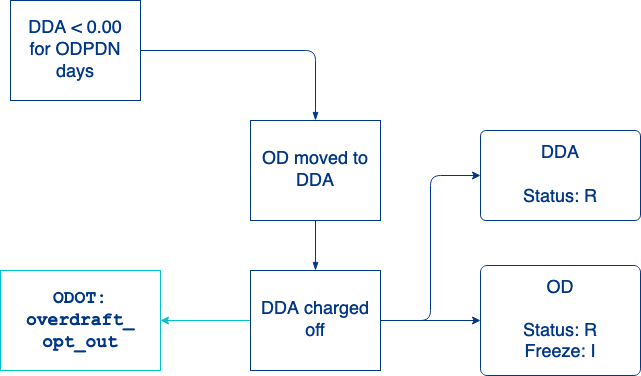
When an overdraft account remains unpaid for a specified period (typically 35 days set by ODPDN), a process to transfer funds and charge-off the account is triggered. The charge-off date is determined by the oldest unpaid transaction across all spending accounts linked to the overdraft account.This flowchart illustrates a possible configuration for the charge-off process with multiple spending accounts with a shared balance:
Charge-off
When an overdraft account remains unpaid for a specified period (usually 35 days), a process to transfer funds and charge-off the account is triggered. This flowchart illustrates a possible configuration for the charge-off process.
- SoFi Tech Solutions monitors the shared overdraft balance. The charge-off process is triggered when overdraft funds used by a linked spending account is unpaid for the period set by ODPDN.
- The owed funds are moved out of the overdraft account and into the primary account. The total amount owed is now the negative primary account balance combined with the overdraft line of credit consumed (configured with ODPAA).
- The primary account, any linked secondary accounts, and overdraft account are set to status:
R(charge-off) (configured with ODMOB). - All linked spending accounts are updated to account feature
17(overdraft eligibility or participation) is set toI(ineligible). All linked spending accounts can no longer use the overdraft account (configured with ODOBI), regardless of what account drew from the overdraft line of credit. - SoFi Tech Solutions sends the
ODOT: overdraft_opt_outevent.
Updated 6 days ago