

Setting Up Payment Method Switch
This guide explains how to set up Payment Method Switch using the Get Billpay Switch Token endpoint. Before performing this procedure, read the Payment Method Switch guide for general information on the user experience and use cases.
Result of following this procedure
Account holders can use your interface to switch their saved payment methods for different billers.
Setup
You must integrate with Finicity through its SDK. Obtain the documentation from the Payment Method Switch provider. SoFi Tech Solutions must also perform setup steps on the back end.
Workflow
These are the entities involved in Payment Method Switch:
- Account holder — Your customer, who has at least one account on your platform.
- Your system — Your mobile app or web page, which has a control to launch the Payment Method Switch process
- SoFi Tech Solutions — The system
- SDK — Interfaces with the switch provider
- Switch provider — Interfaces with the biller
- Biller — Merchant billing you for recurring services, such as Netflix, Verizon, PayPal, Venmo, Doordash, Chase, Amazon, Walmart, and more
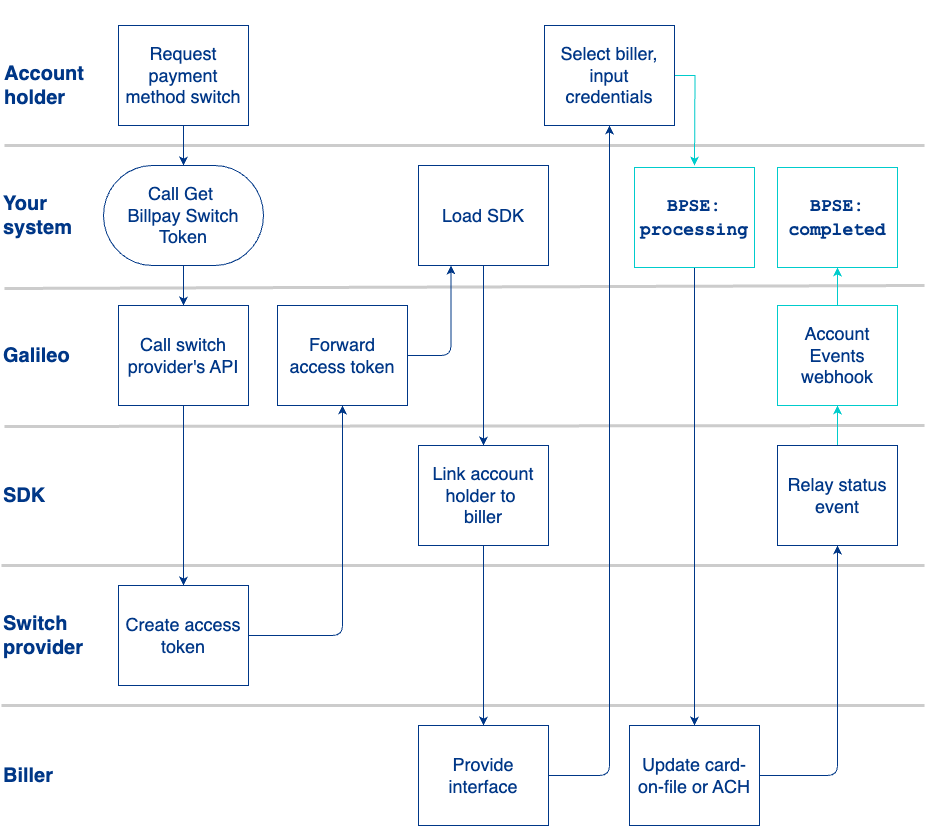
- Your customer creates a new account on your platform, or the account holder already has an account on your platform.
- The account holder activates a "payment method switch" control on your interface.
- You call the Get Billpay Switch Token endpoint and pass the DDA and the card information of the account that will be billed. You can include multiple savings accounts, multiple DDA accounts, and multiple PRNs for card accounts.
- SoFi Tech Solutions forwards the token request to the switch provider, which generates the token.
- SoFi Tech Solutions forwards the token to you in the endpoint response.
- The SDK calls the biller's interface and passes the account holder's DDA or card information.
- The biller or merchant returns its interface, which you present to the account holder.
- The account holder selects the biller or merchant from the interface and inputs their login credentials.
- SoFi Tech Solutions sends the
BPSE: billpay_switch_eventmessage withstatus: processing. - The biller or merchant sets up a recurring withdrawal (ACH debit) with the ACH or card information previously supplied.
- The Payment Method Switch provider returns a webhook message to SoFi Tech Solutions that reports success.
- SoFi Tech Solutions sends the
BPSE: billpay_switch_eventmessage withstatus: completed.
Example scenarios
These scenarios illustrate the Payment Method Switch process with a user selecting either their debit card or their DDA account for separate billers initiated from your application. The core process and the SDK experience are identical regardless of the payment method chosen by the user.
Both of these scenarios apply to Adela Sanchez, who has a DDA (PRN: 999103447228) with a new debit card ending in 2094 with YourFinanceApp.
Scenario 1: Switch card on file
Adela wants to update the default payment method for Netflix to her new card.
- In YourFinanceApp's application, Adela selects the "payment method switch" option.
- YourFinanceApp's application calls Get Billpay Switch Token with these values:
| Object | Parameter | Value |
|---|---|---|
ddAccounts | accountNo | 999103447228 |
routingNo | 124001545 | |
accountType | checking | |
title | My checking account | |
cardAccounts | PRN | 999103447228 |
NoteBy default, both the
ddAccountsandcardAccountsdetails are shared in every token.
- SoFi Tech Solutions passes the values to the payment method switch provider in a token request.
- The payment method switch provider returns the token and SoFi Tech Solutions forwards it to YourFinanceApp's application.
- YourFinanceApp's application uses the received token to load the payment method switch SDK. The SDK presents Adela with a list of billers, she selects Netflix.
- The SDK then presents her with the option to choose between her DDA and her debit card details. She chooses her debit card ending in 2094.
- Next, she is presented with a secure login page for Netflix and she enters her credentials.
- YourFinanceApp's application indicates that the payment method has been successfully updated to her debit card. Her payments to Netflix will now be over payment card rails.
Scenario 2: Switch to ACH
Adela wants to update the default payment method for Xfinity to ACH.
- From YourFinanceApp's application, Adela selects the "payment method switch" option.
- YourFinanceApp's application calls Get Billpay Switch Token with these values:
| Object | Parameter | Value |
|---|---|---|
| ddAccounts | accountNo | 999103447228 |
| routingNo | 124001545 | |
| accountType | checking | |
| title | My checking account | |
| cardAccounts | PRN | 999103447228 |
- SoFi Tech Solutions passes the values to the payment method switch provider in a token request.
- The payment method switch provider returns the token and SoFi Tech Solutions forwards it to YourFinanceApp's application.
- YourFinanceApp's application uses the received token to load the payment method switch SDK. The SDK presents Adela with a list of billers, she selects Xfinity.
- The SDK then presents her with the option to choose between her DDA and her card. She chooses her DDA.
- Next, she is presented with a secure login page for Xfinity and she enters her credentials.
- YourFinanceApp's application indicates that the payment method has been successfully updated to her DDA. Her payments to Xfinity will now be via ACH.
Events API
During the payment method switch process, SoFi Tech Solutions sends theBPSE: billpay_switch_event Account Event any time the status of the payment method changes. This event is first triggered when SoFi Tech Solutions generates a token and sends it to you in the endpoint response. Subsequent status changes also trigger this event message.
The possible values for status are:
processing— The payment method switch is being set up.completed— The payment method switch has been successfully set up.failed— The payment method switch process failed.
When status: failed, the status_reason field is populated by one of the values in the Payment Method Switch Failure Status Reasons enumeration.
Viewing payment method switches
Request the Payment Method Switch RDF, which contains all of the payment method switch transactions from the previous day.
Updated 6 days ago