

Creating an Adjustment
An adjustment is a transaction that modifies the balance in a customer account. In the Program API, you can manually make an adjustment that credits or debits your customer’s account using the Create Adjustment endpoint. SoFi Tech Solutions' internal processes also can make adjustments, and an external entity might make an adjustment, such as when a financial institution makes an inbound debit request to move funds out of your customer’s account.
This guide provides an overview of adjustments and describes the endpoints and tools for creating, reversing, and viewing adjustments in the system.
Adjustment use cases
These are some common use cases for adjustments.
- Fee reimbursement — If your customer incurs a fee that should be reimbursed, you can create an adjustment that credits the fee amount to the customer’s account. For example, you can create an adjustment to reimburse an ATM withdrawal fee. (Depending on your setup, you can use the Reverse Fee endpoint instead.)
- Non-card based account debit — Adjustments debit funds for non-card transactions, such as bill pay, account to account, and outbound ACH transactions.
- Dispute resolution — If your customer successfully disputes a transaction, you can create an adjustment to credit the funds for the dispute to your customer’s account. See Provisional credit in the Disputes at SoFi Tech Solutions guide for more information.
- Rewards and third-party integrations — You can create adjustments for regular transactions that are established at the program level that credit or debit external accounts based on daily aggregates (for example, loading a debit card or sending funds using a third-party acquiring service).
Payments vs. adjustments
The system classifies transactions into one of four categories: authorization/settlement, payment, adjustment, and fee. (See Classifying transactions in the About Transactions guide for more information.) These are the differences between a payment made with the Create Payment endpoint and an adjustment made with the Create Adjustment endpoint.
- Direction of funds — The Create Payment endpoint moves funds only into a customer’s account while the Create Adjustment endpoint moves funds either into or out of a customer’s account.
- Velocity limits — The Create Payment endpoint applies velocity limits to transactions while Create Adjustment usually does not. Typically, the Create Adjustment endpoint is used to make administrative adjustments for an account balance, which may mean that velocity limits should not be applied.
- Account status — The Create Payment endpoint takes account and card status into consideration when a payment is posted. Create Adjustment usually ignores the account or card status because administrative activities may need to be performed on canceled accounts or cards. On the other hand, the STPLD parameter contains a list of statuses that do not permit transactions originated by Create Account Transfer (sending account only), Create Payment, Create Adjustment, and Create ACH Transaction.
- Hold days — The Create Payment endpoint accounts for pending hold days, which you can update with the Update Payment endpoint. The Create Adjustment endpoint does not account for hold days. Adjustments are immediately inserted into the account without significant delay.
NoteSee the Creating a Payment guide for more information about creating, reversing, and updating payments.
Summary of payments and adjustments
This table summarizes the differences between payment and adjustment endpoints.
| Endpoint usage | Create Payment | Create Adjustment |
|---|---|---|
| Moves funds into customer account | X | X |
| Moves funds out of customer account | X | |
| Applies velocity limits to transactions | X | |
| Ignores account and card status | X | |
| Accounts for pending hold days | X |
Create Adjustment endpoint
Use the Create Adjustment endpoint to modify the balance of a customer account. You can use this endpoint to either credit or debit the account.
This table describes parameters that are specific to the Create Adjustment endpoint.
| Parameter | Description |
|---|---|
accountNo | The account number for the account to be adjusted. |
amount | The amount to credit or debit, as a decimal or whole number. Do not use a negative number. Instead, indicate the direction of funds in the debitCreditIndicator field. |
type | Use one of the values that SoFi Tech Solutions provides to you. |
debitCreditIndicator | Indicates whether to credit or debit the account by the value in amount:C — CreditD — Debit |
includeRtfTransfer | Valid only when performing an adjustment on an RTF spending account. Set to 0 to prevent the adjustment from affecting the corresponding RTF funding account. |
NoteWhen initiating a transaction with the Program API, the
transactionIdfrom the API request is copied to the external transaction ID field of all transactions that result from the request. The external transaction ID is available in the responses to transaction-retrieval Program API requests asexternal_trans_id, in the Posted Transactions RDF asEXTERNAL TRANSACTION ID, and in the Events API webhook messages asext_trans_id.
Reversing an adjustment
Although the Program API has a Reverse Adjustment endpoint, SoFi Tech Solutions recommends that you not use it to reverse adjustments, because of the way that endpoint handles transaction codes. If you use the Reverse Adjustment endpoint, the reversed transaction will have the same transaction code as the original adjustment.
Instead, when you design your funds-flow schema with SoFi Tech Solutions, make sure that you have an otype that designates the appropriate reversal. Using the Create Adjustment endpoint, reverse the original adjustment by passing the opposite direction for debitCreditIndicator and by using the corresponding reversal otype for type.
Create Adjustment workflow
This flowchart shows the logical progression of the Create Adjustment endpoint. The actual sequence of events in the system may vary.
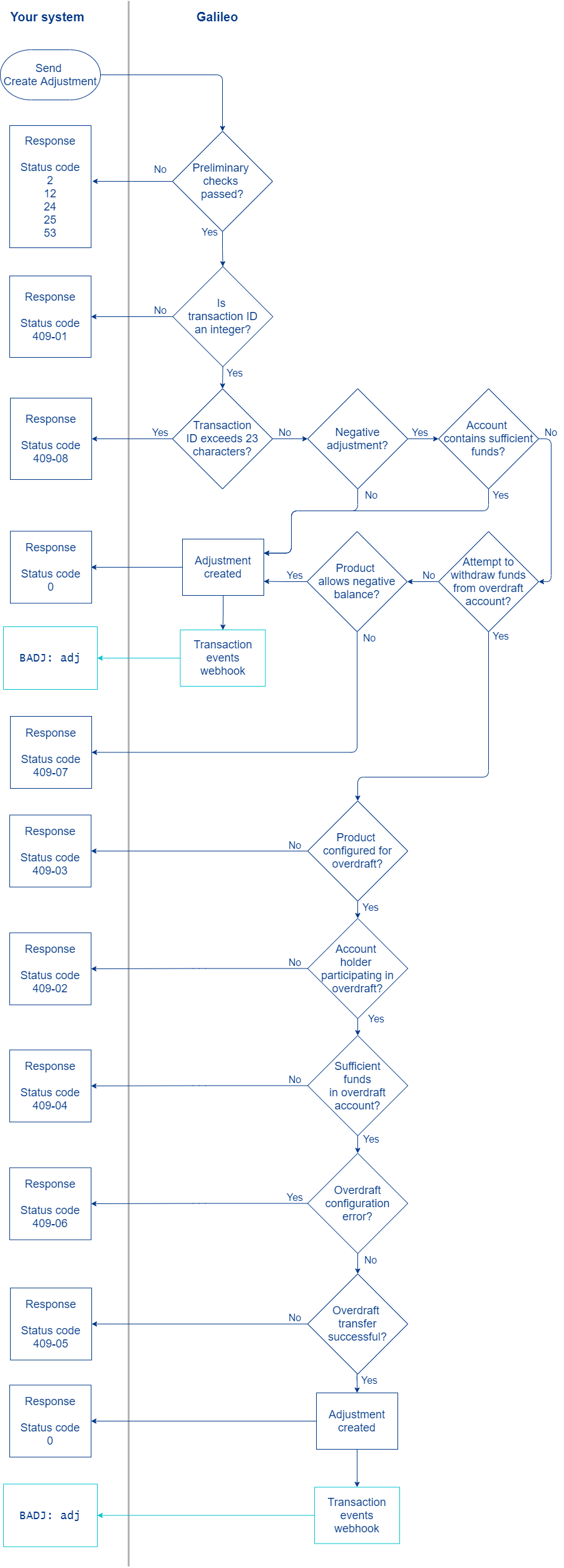
- You send the Create Adjustment request.
- SoFi Tech Solutions performs preliminary checks. Failures return the status codes shown in the diagram. Consult the Status codes for the Create Adjustment endpoint for next steps.
- SoFi Tech Solutions verifies that the transaction ID is an integer. If it is not, the endpoint returns
status_code: 409-01. An integer is required so that if there is a later call to the Reverse Adjustment endpoint, the transaction ID is an exact match. - SoFi Tech Solutions verifies that the transaction ID is 23 characters or less. If it exceeds 23 characters, the endpoint returns
status_code: 409-08. - SoFi Tech Solutions checks the
debitCreditIndicator:
*. IfdebitCreditIndicatoris set toC, SoFi Tech Solutions moves funds into the account, returnsstatus_code: 0and sends theBADJ: adjevent if it is configured.- . If
debitCreditIndicatoris set toD, SoFi Tech Solutions checks whether there are sufficient funds in the account. If there are sufficient funds, SoFi Tech Solutions moves funds out of the account, returnsstatus: 0and sends theBADJ: adjevent.
- . If
If there are not sufficient funds, SoFi Tech Solutions performs the following checks:
- SoFi Tech Solutions checks if the product is either configured to allow a negative balance (ALWNB is set to
1at the provider level) or if there is a corporate finance tree to handle insufficient funds. If either are true, SoFi Tech Solutions moves funds out of the account, returnsstatus: 0and sends theBADJ: adjevent. - If the product does not allow a negative balance and overdraft withdrawals should not be attempted, the endpoint returns
status_code: 409-07. - SoFi Tech Solutions verifies that the product is configured for overdraft. If not, the endpoint returns
status_code: 409-03. - SoFi Tech Solutions verifies that the account holder is participating in overdraft. If not, the endpoint returns
status_code: 409-02. - SoFi Tech Solutions verifies that the overdraft account has sufficient funds to cover the adjustment. If not, the endpoint returns
status_code: 409-04. - SoFi Tech Solutions verifies that the overdraft account is configured for adjustments. If not, the endpoint returns
status_code: 409-06. - SoFi Tech Solutions verifies that funds from the overdraft account were transferred successfully. If not, the endpoint returns
status_code: 409-05. - The endpoint returns
status_code: 0and creates the adjustment by crediting or debiting the account. - SoFi Tech Solutions sends Transaction Events webhook message
BADJ: adj.
Viewing adjustments
You can view a record of adjustments to a customer account using any endpoint that returns posted transactions:
NoteThere is a delay of several seconds before an adjustment appears in a customer’s transaction history.
Consult Finding Transaction Data to see where else adjustments are visible.
Events API webhook
When an adjustment is made for an account balance (either credit or debit), the BADJ: adj event message is triggered, if it is configured.
The BADJ: adj event is also triggered by internal and external processes that credit or debit an account. Depending on your configuration, this may include:
- Adjustments made via CST
- Adjustments made by internal processes
- Inbound merchant credit
- Fees and reimbursements
- Withdrawals from an overdraft account
- Authorization reversals
- ACH returns
- Outbound ACH credit
- Billpay transactions
Status codes
Consult the Create Adjustment endpoint for status codes and next steps.
| Status code | Description | Next step |
|---|---|---|
409-01 | The transactionId parameter is not an integer value. | Retry with a valid transactionId. |
409-02 | An overdraft adjustment was attempted but the account holder is not participating in overdraft. | Follow your business plan for this event. |
409-03 | An overdraft adjustment was attempted but the product for the account is not configured for overdraft. This could mean that: | Follow your business plan for this event. |
409-04 | The overdraft account has insufficient funds to cover the negative adjustment. | Follow your business plan for this event. |
409-05 | Overdraft funds did not successfully transfer. | Retry the adjustment. |
409-06 | Account holder overdraft configuration error. | Check the customer’s overdraft configuration. |
409-07 | The account balance contains insufficient funds for the adjustment and the following conditions are met:1 to allow the account balance to be driven negative. | Follow your business plan for this event. |
409-08 | The transactionId parameter exceeds 23 characters. | Retry with a valid transactionId. |
Using the CST for adjustments
You can use the CST to create and view adjustments for an account. The following are actions that you can take in the CST that will result in an adjustment.
- Create an adjustment from the Insert Adjustments page.
- Mark a return from the Payment History page.
- Initiate or recover an account chargeoff from the Account Info page.
- Process a dispute by issuing temporary credit, or by releasing or reversing a transaction from the Adjustment History page.
NoteSome CST controls may not be available for all users depending on your administrator’s Roles and Rights settings. A user must have permission to create and modify specific adjustment types and to set adjustment limits. No adjustments are allowed until an adjustment limit is set.
This table describes controls for creating and viewing adjustments in the CST.
| CST control | Location | Description |
|---|---|---|
| Insert Adjustment | Account > Finance Bar | Create an adjustment for the account. Enter a positive amount to credit the account and a negative amount to debit the account. |
| Account Details | Account > Account Info | View all transactions for the account, including adjustments. |
| All Transactions | Account > Account Info | View details and totals for all transactions within a specified time period, including adjustments. |
| Adjustment History | Account > Account Info | View the entire history of adjustments made for the account. |
NoteAlthough you must set the ALWNB parameter to allow the Program API to drive an account negative, this parameter does not apply to transactions initiated in the CST. Instead, adjustments in the CST can drive an account negative by default.
SoFi Tech Solutions setup
| Parameter | Level | Description |
|---|---|---|
| ADJLM | Product | Specifies the maximum amount for adjustments made through the CST. |
| ALWNB | Provider | Controls whether a call to the Create Adjustment endpoint can drive an account balance negative. When this parameter is set at the product level, it permits the account to be driven negative by the Create Account Transfer endpoint. |
| STPLD | Product | Contains a list of statuses that do not permit transactions originated by Program API: Create Account Transfer (sending account only), Create Payment, Create Adjustment, and Create ACH Transaction. Does not affect transactions originated in the CST. |
Updated 6 days ago