

Direct POST PIN-Set Procedure
This guide describes the direct POST procedure for setting PINs using the Get Card PIN Change Key and Commit Card PIN Change endpoints. This procedure involves transferring PCI-sensitive information directly from the cardholder's device to SoFi Tech Solutions' system using an HTML PIN-set form that you host.
Go to PIN-Set Procedures for other methods.
NoteYou must complete PCI-DSS Self-Assessment Questionnaire A-EP (191 of 250 PCI requirements) to use this procedure. See Prior setup for details.
Use this procedure to:
- Set a cardholder’s PIN for a new card
- Reset a cardholder's PIN for an existing card
The direct-POST PIN-set process transfers PIN data from the cardholder directly to SoFi Tech Solutions without the data passing through your system, thereby satisfying information security requirements. The process involves the following high-level steps:
- You call the SoFi Tech Solutions Program API to get a PIN-set access key.
- You present the cardholder with an HTML PIN-set form that you host, including fields for the new PIN value and hidden fields that include the access key. The HTML form is targeted at SoFi Tech Solutions servers.
- The cardholder submits the form POST and SoFi Tech Solutions processes the data.
- An HTTP 302 redirect sends the cardholder's browser to a pre-configured page that you host, for success or failure.
- You parse the response information in the HTTP query string to get the result.
- If successful, you make a call to the SoFi Tech Solutions Program API to commit the PIN change.
Options
You will need to decide among these options before using this procedure.
- Token/key validity:
- Amount of time — Default is five minutes.
- Number of attempts — Default is five attempts.
- Whether to use one or two results pages for success and failure.
Prior setup
After you have been approved to use the direct POST method, you must coordinate with SoFi Tech Solutions to get set up. You need to provide:
- Issuing bank approval
- AOC, to be reviewed by SoFi Tech Solutions Information Security Team
- The URLs for your success and failure pages, which SoFi Tech Solutions will use in the HTTP 302 redirects.
- If the success redirect URL is
https://pin.foo.com/pin-success, SoFi Tech Solutions must registerhttps://pin.foo.comin the system to allow the redirect. - If you are using a failure redirect URL and it shares the same base URL (e.g.
https://pin.foo.com/pin-failure), no additional base URLs need to be registered.
- If the success redirect URL is
From SoFi Tech Solutions you need:
- Submitter ID
Workflow
Review this flowchart for the workflow:
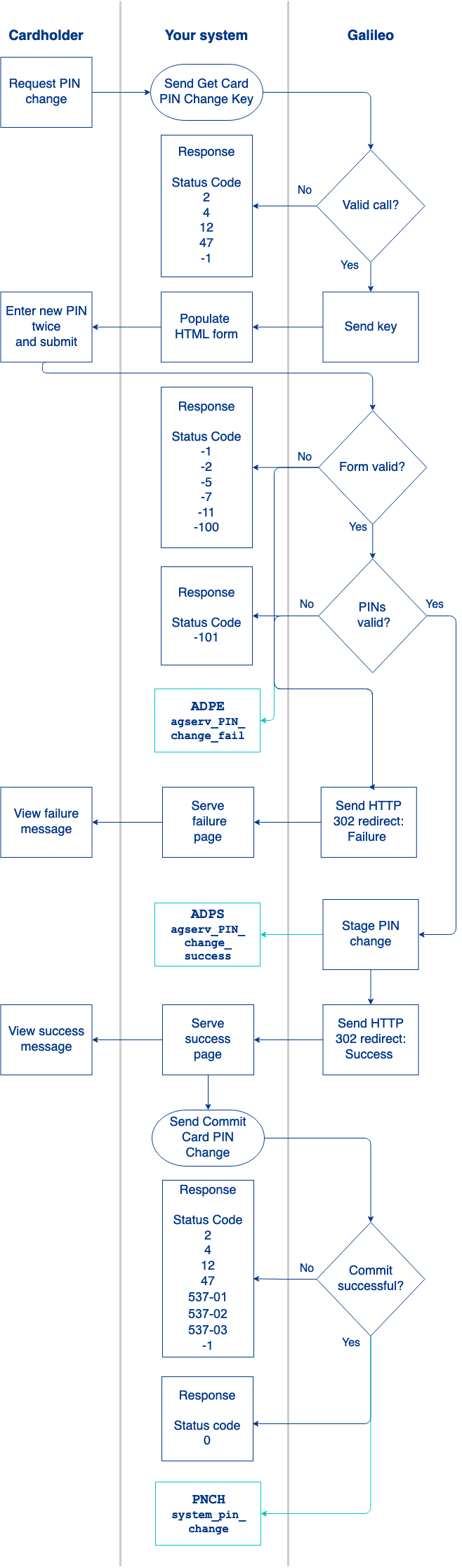
1. Cardholder accesses the PIN-change form
Either on your web page or mobile app, the cardholder indicates the desire to set or change a PIN.
2. Send the Get Card PIN Change Key call
SoFi Tech Solutions recommends that you pass the CAD (card_id) for accountNo in the Get Card PIN Change Key call. You can retrieve the CAD with the Get Card endpoint.
In the response, SoFi Tech Solutions sends a 50-character key in the token field. This key is valid for a limited time and for a specified number of uses, which are configured in your provider parameters. Defaults are five minutes and five attempts. The key cannot be reused after a success.
Consult the Get Card PIN Change Key endpoint for status codes and next steps, if any.
3. Generate the HTML interface
Present an HTML form to the cardholder that is targeted (via the action attribute) at a SoFi Tech Solutions endpoint.
The form must contain these elements:
| Element | Description |
|---|---|
pin | The cardholder's desired PIN |
pin_reentry | The re-entered PIN, for validation purposes |
pin_change_key | 50-character key (token) that was returned by the Get Card PIN Change Key endpoint |
submitter_id | An identifier that SoFi Tech Solutions has provided to you, with the format [provider_id]-9999 |
submit_unique | Optional. Unique identifier that you provide, similar to transactionId in the Program API |
submit_dt | Optional. Timestamp formatted as YYYY-MM-DD hh:ii:ss |
Sample HTTP form
The URL in the example is an AWS instance that SoFi Tech Solutions sets up for each client. Request an AWS URL from SoFi Tech Solutions if you do not already have one. This sample form is for the CV environment. For Production change cv in the URL to pd.
<form enctype=\"application/x-www-form-urlencoded\" action=\"https://agserv-[clientname].cv.gpsrv.com/agserv/pin" method=\"post\">
  <input type=\"hidden\" name=\"submitter_id\" value=\"222-2222\" id=\"submitter_id\">
  <input type=\"hidden\" name=\"submit_unique\" value=\"3333-3333-3333\" id=\"submit_unique\">
  <input type=\"hidden\" name=\"submit_dt\" value=\"2020-11-23 17:03:12\" id=\"submit_dt\">
  <input type=\"hidden\" name=\"pin_change_key\" id=\"pin_change_key\" value=\"888tOkEn777777AaaaaaAtOkEn999999999999999999999999\">
  <input type=\"text\" name=\"pin\" id=\"pin\" value=\"\">
  <input type=\"text\" name=\"pin_reentry\" id=\"pin_reentry\" value=\"\">
</form>
4. Cardholder submits the form
The cardholder enters and re-enters the PIN and submits the data via a form POST directly to SoFi Tech Solutions, without traversing your system. If submitting the form times out, SoFi Tech Solutions sends a failure message. If submitting the form is otherwise unsuccessful, such as the form being incorrectly formatted, SoFi Tech Solutions sends a failure message.
If the form submission is successful, SoFi Tech Solutions performs two verification checks:
- The PINs have four digits each
- The PINs match
If the verification checks are successful, SoFi Tech Solutions stages the PIN change.
5. SoFi Tech Solutions sends the redirect
SoFi Tech Solutions processes the PIN-set form POST and responds via an HTTP 302 redirect to your pre-defined URLs: either the success or failure page. According to your arrangements with SoFi Tech Solutions, you will also receive the ADPE: agserv_PIN_change_fail or ADPS: agserv_PIN_change_success Account Events webhook messages.
6. Send the Commit Card PIN Change call
The HTTP 302 redirect contains two query string elements that indicate success or failure conditions:
r— The response code element contains the success or failure state of the cardholder form POST, in URL encoding. See the HTTP 302 redirect codes table for a description of these response codes.e— The error element is populated only when there is a data-validation error. For example: ifpinorpin_reentryare not populated, theeelement contains a JSON string that communicates the data validation errors, as shown below.
HTTP 302 redirect examples
These are examples of the redirect messages that SoFi Tech Solutions will send in response to the direct POST: success or failure. Notice that in the second example the e element provides text for each of three fields that might have failed.
Success:yourdomain.com/r=0Failure:yourdomain.com?r=-2&e={"pin":{"isEmpty":"Value%20is%20required%20and%20can%27t%20be%20empty"},"pin_reentry":{"isEmpty":"Value%20is%20required%20and%20can%27t%20be%20empty"},"pin_change_key":{"isEmpty":"%27pin_change_key%27%20is%20required%20and%20cannot%20be%20empty"}}7. Send the Commit Card PIN Change call
If you receive a Success message in the HTTP 302 redirect, send the Commit Card PIN Change call to commit the change. Use the same accountNo that you used for the Get Card PIN Change Key call.
Consult the Commit Card PIN Change endpoint reference for status codes and next steps.
When the PIN change is successful, SoFi Tech Solutions sends the PNCH: system_pin_change event. At this point, the cardholder can use the PIN, and you can retrieve the PIN via the PIN Retrieval Service if you are subscribed to that service.
SoFi Tech Solutions setup
These internal, provider-level parameters must be set at SoFi Tech Solutions.
See the PIN-set procedures parameters table for the full list of product parameters to be configured at SoFi Tech Solutions.
| Parameter | Description |
|---|---|
| GGDPA | Enable direct POST access |
| GGHDR (optional) | A set of key/value pairs for additional response headers when using no-redirect mode |
| GGKEH (optional) | Number of times a PIN-set token can be used. Default: 5 |
| GGKEX (optional) | Seconds before token expiry. Default: 300 |
| GGRDR | Full redirect URL when using a single results page |
| GGRBU | Base redirect URL when using both success and failure redirect pages |
HTTP 302 redirect codes
These statuses are returned in the HTTP 302 redirect in the r response code element.
| Code | Description | Next steps |
|---|---|---|
0 | Success | Continue the procedure. |
-1 | System error | Contact SoFi Tech Solutions for troubleshooting. |
-2 | Malformed or missing data | Retry with valid data. |
-3 | Bad signature | Retry with a valid signature. |
-4 | Account is in charged-off status and cannot be modified | Retry with an account that is not charged off. |
-5 | Invalid provider | Retry with a valid provider ID. |
-6 | Configuration error | Contact SoFi Tech Solutions for troubleshooting. |
-7 | Invalid submitter ID | Retry with a valid submitter ID. |
-8 | Inactive payment account | Retry with an active payment account or reactivate the account. |
-9 | Problem with the redirect URL configuration | Verify that SoFi Tech Solutions has properly configured the GGRDR or GGRBU provider parameter. |
-10 | Direct POST not allowed | Verify that you have been approved to use the direct POST method and have configured it with SoFi Tech Solutions. |
-11 | Cardholder submitted a form with a token that is no longer valid, because Get Card PIN Change Key was called again, invalidating the previous key. | Verify that the form is using the correct key before calling Get Card PIN Change Key again. |
-100 | Token not valid or expired | Retry with a valid token. You may need to call Get Card PIN Change Key again. |
-101 | Entered and re-entered PIN values do not match | Inform the cardholder that the PIN values must match. |
-102 | PIN change request not in correct status | Verify that the PIN change request has been staged but not committed. |
-103 | Expired token | Retry with an updated token from Get Card PIN Change Key. |
Commit Card PIN Change status codes
Consult the Commit Card PIN Change endpoint reference for status codes and next steps.
Updated 6 days ago