

Creating a Payment
This guide describes the procedure to move funds into a customer account, make payment reversals, and update payment hold days using the Create Payment and Update Payment endpoints.
NoteSoFi Tech Solutions uses the term "payment" to refer to funds that are deposited into a customer account by the Create Payment endpoint and by other processes. The term "load" is often used as a synonym.
Follow this procedure to:
- Test whether funds can be deposited into a customer account.
- Move funds into a customer account at a time other than account creation.
- The source of the funds is determined by the "load type" that you have configured with SoFi Tech Solutions
- Deposit funds into a customer account and place a hold on some or all of the amount.
- Reverse a payment and check for any reversal fees.
- Update or remove the hold days for a pending payment.
Do not follow this procedure to:
- Remove funds from an account; instead, consult Creating an Adjustment.
- Transfer funds from one account to another in the same program; instead, use the Creating an Internal Transfer procedure.
- Deposit funds that arrive at SoFi Tech Solutions over external rails, such as a card network, ACH, wires, or instant-debit transfers.
Also see Payments vs. adjustments in the Creating an Adjustment guide.
Result of calling Create Payment
- The specified amount is credited to the receiving account.
- If configured, a fee is assessed to the sending (or sometimes receiving) account.
- If specified, a hold is placed on all or part of the deposit, and that amount is removed from the available balance.
The transaction types for deposits using the Create Payment endpoint depend on the value in the type parameter. For example, if a $100.00 retail load is made to the receiving account PRN 77777, and the system is configured to assess a 15-cent fee for retail loads (otype RL), calling Create Payment would produce these transactions:
| pmt_ref_no | trans_code | amt | external_trans_id |
|---|---|---|---|
| 77777 | PMRL | 100.00 | 39e5-14a2 |
| 77777 | FE0210 | -0.15 | 39e5-14a2 |
The external_trans_id is the transactionId from the API request.
If you configure a $25 hold, it will produce this additional transaction:
| pmt_ref_no | trans_code | amt | external_trans_id |
|---|---|---|---|
| 77777 | THRL | -25.00 | 39e5-14a2 |
Result of calling Update Payment
The hold days for the original Create Payment call are updated, meaning that:
- Previously configured hold days for the product are replaced with the specified number.
- If the number of hold days is changed to zero, the hold is removed.
Creating a payment
Prior to creating a payment, you can call the Verify Account endpoint and pass the intended otype in the loadType parameter. You can use only load types that SoFi Tech Solutions has added to your funds-flow schema.
The endpoint returns these values:
max_load_amount— The maximum amount configured for the load limit. This amount does not take into account other loads that may have reduced the available limit amount.balance— The available balance (open to buy) on the account.account_status— The current account status. Only some statuses permit payments, as shown in the Account Statuses enumeration.
Using these values you can determine whether to call Create Payment.
Create Payment parameters
This table explains parameters for the Create Payment endpoint.
| Parameter | Usage |
|---|---|
accountNo | The receiving account's PRN or PAN. |
amount | The amount to transfer, as a decimal or whole number. |
type | Use a valid value as configured for you by SoFi Tech Solutions |
description | Your description of the transaction. If the type is an otype that has been custom-created for your program, then the description for that otype will override what you provide for this parameter. |
location | Unique identifier for the location where the payment occurs, if you are using location management. |
locationType | If the location type is 0 or 1, the payment will be allowed or disallowed based on the location. Location types are:0 — SoFi Tech Solutions1 — Provider2 — Don't validate load |
verifyOnly | Pass 1 to verify parameter values in your API call without creating a payment. |
providerAssessedFee | If a fee is assessed, pass the amount of the fee for informational purposes. To assess the actual fee, use the Assess Fee endpoint. |
| Merchant and store parameters | Used by some retail locations that load funds onto cards. |
holdAmount | Amount of the payment to hold. This can be the whole amount or part of the amount. Cannot be greater than amount |
holdExpirationDateTime | When to expire the hold. Leave blank to hold the amount indefinitely |
holdDescription | A description for the hold. |
holdExternalId | A user-provided ID for the hold. |
When you populate the hold-related parameters, SoFi Tech Solutions returns a hold_id that you can retrieve using the Get Hold History endpoint. To manually expire a hold created in this way, use the Expire Hold endpoint.
Create Payment workflow
This flowchart shows the logical progression of the Create Payment endpoint. The actual sequence of events in the system may vary.
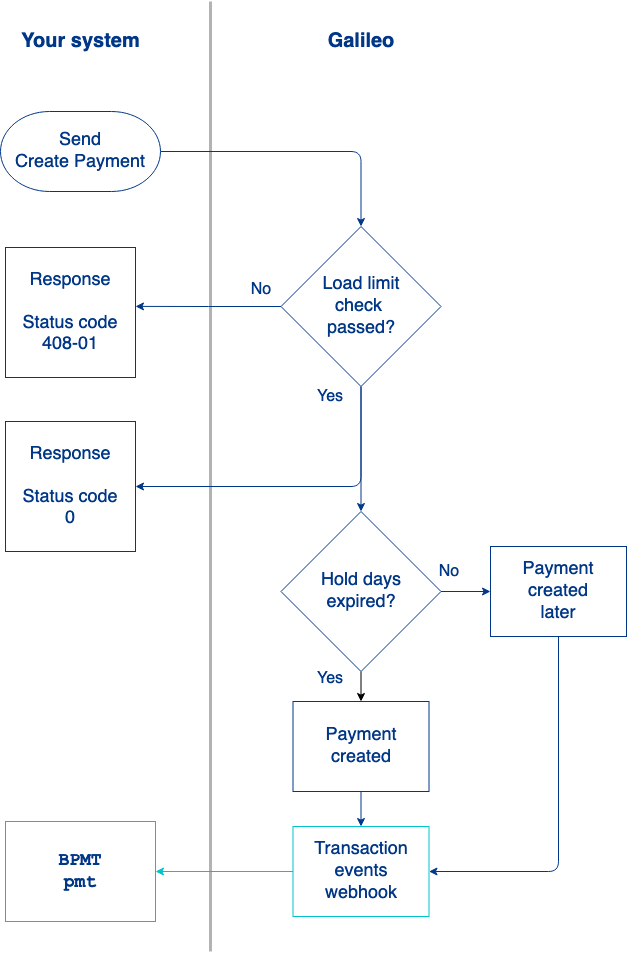
- You send the Create Payment request.
- SoFi Tech Solutions performs a number of preliminary checks. Failures return the status codes shown in the diagram.
- SoFi Tech Solutions verifies that the payment is within load limits for the receiving account. If it is not, the endpoint returns
status_code: 408-01. - The endpoint sends
status_code: 0. - SoFi Tech Solutions sends the
BPMT: pmtevent message for the receiving account. - If the
holdAmountparameter was populated, thehold_daysfield in theBPMT: pmtevent message is populated with the number of hold days before the funds are available.- SoFi Tech Solutions sends the CHRD: create_hold event message because the endpoint created a hold. old
SoFi Tech Solutions waits until the hold days expire.
6. SoFi Tech Solutions creates the transaction by crediting the receiving account. If a load limit was violated, SoFi Tech Solutions creates a payment for a partial amount.
NoteWhen initiating a transaction with the Program API, the
transactionIdfrom the API request is copied to the external transaction ID field of all transactions that result from the request. The external transaction ID is available in the responses to transaction-retrieval Program API requests asexternal_trans_id, in the Posted Transactions RDF asEXTERNAL TRANSACTION ID, and in the Events API messages asext_trans_id.
Updating a payment
You can update the hold days on a payment that has not been processed. The payment must be in status: R (ready to process) to be updated.
Update Payment parameters
This table explains parameters for the Update Payment endpoint.
| Parameter | Usage |
|---|---|
accountNo | The receiving account number in the original API call. |
pmtId | The payment ID for the payment to be updated. This value is returned as payment_trans_id by the Create Payment endpoint or as pmt_id by the Get Payment History endpoint. |
holdDays | Number of days to hold the payment. Pass 0 or leave blank to post the payment to the receiving account the next time payments are posted. |
Update Payment workflow
The logical progression of the Update Payment endpoint is as follows:
- SoFi Tech Solutions looks for the payment ID. If it cannot find it, SoFi Tech Solutions returns
status: 533-01. - SoFi Tech Solutions verifies that the payment is in
status: R. If it is not, SoFi Tech Solutions returnsstatus: 533-02. - SoFi Tech Solutions updates the number of days to hold the payment. If the updated value is 0, SoFi Tech Solutions posts the payment immediately and sends the
BPMT: pmtevent message.
Reversing a Payment
When you design your funds-flow schema with SoFi Tech Solutions, make sure that you create an otype that designates a reversal for each type of payment. Using the Create Adjustment endpoint, reverse the original payment by passing the corresponding reversal otype for type.
Viewing payments and holds
You can view a record of payments deposited to a customer account as well as the holds using any endpoint that returns posted transactions:
- Get Account Overview
- Get Transaction History
- Get All Transaction History
- Get Payment History
- Get Hold History
NoteThere is a delay of several seconds before a payment appears in a customer’s transaction history and account overview.
Consult Finding Transaction Data to see where else payments are visible.
Sample endpoint request and response
Consult the Create Payment and Update Payment endpoints to see how to build the API request and to see the response schema.
Status codes
Consult the Create Payment and Update Payment endpoints for status codes and next steps.
Updated 6 days ago