

Activating a Card
This guide explains how to activate physical cards using the Activate Card endpoint.
Follow this procedure to:
- Activate a physical card for the first time.
- Activate a physical Digital First card.
NoteIf you are not PCI compliant, you can use this procedure only under certain circumstances. See PCI compliance in Setting Up a Card Program for details.
Do not follow this procedure to:
- Activate a virtual card; most virtual cards are active upon creation. For those that are not, use the Modify Status endpoint with
type: 7. - Restore a card to active status; instead, use Modify Status with
type: 7to change only the card status but not trigger any other processes.
See Card activation in Setting Up a Card Program for information on other activation methods.
ImportantMastercard and Visa consider
status: L(lost),status: S(stolen),status: C(canceled), andstatus: Z(canceled without refund) to be permanent statuses.
- Issuers are required to return the appropriate response codes for accounts or cards with any of those statuses. Refer to the Account and card status response codes table for the network-specific response codes.
- If you reactivate a card or account that was closed, the card network could assess penalties for transactions attempted against that card.
- To temporarily close an account or card to reopen later, use
status: D(disabled) or freeze the card.
Result of calling Activate Card
When Activate Card has run successfully, the card is changed to status: N (active). If the CANOC parameter is set, the cardholder's other active cards have been canceled. If temporary cards were issued and the TEMPC parameter is set, the temporary cards have been canceled. (See SoFi Tech Solutions setup for more information.)
- Digital First cards are already in
status: Nupon card creation, so using Activate Card removes the account-feature block that protected the physical card in transit. See Removing the block in the Setup for Digital First guide for details.
Parameters
This table explains the parameters that are specific to the Activate Card endpoint. See the Activate Card endpoint reference for details.
| Parameter | Usage |
|---|---|
accountNo | Pass the PRN, PAN, or CAD. If you pass the PRN you may also want to request cardNumberLastFour from the cardholder to select the correct card. To pass the PAN you must be PCI compliant. If you are not PCI compliant, pass the CAD. |
cardExpiryDate | Cardholder-provided. Use this value to test against the card to be activated. |
cardSecurityCode | Cardholder-provided. Use this value to test against the card to be activated. Omit this parameter if you are not PCI compliant. |
cardNumberLastFour | Cardholder-provided. If you passed PRN as accountNo, and the cardholder has more than one card associated with their account, use this parameter to ensure that the correct card is selected. |
deactivateTemporaryCards | If you issued one or more temporary cards while the cardholder waited for the physical card to arrive in the mail, pass 1 to deactivate those cards. This applies to cards that are associated with the account of the card that is being activated (same PRN), not cards that are associated with other accounts that the account holder has. The TEMPC parameter must be set for this parameter to take effect. |
Card-activation workflow
This flowchart shows the logical progression of the Activate Card endpoint. The actual sequence of events in the system may vary. This workflow does not apply to Digital First cards.
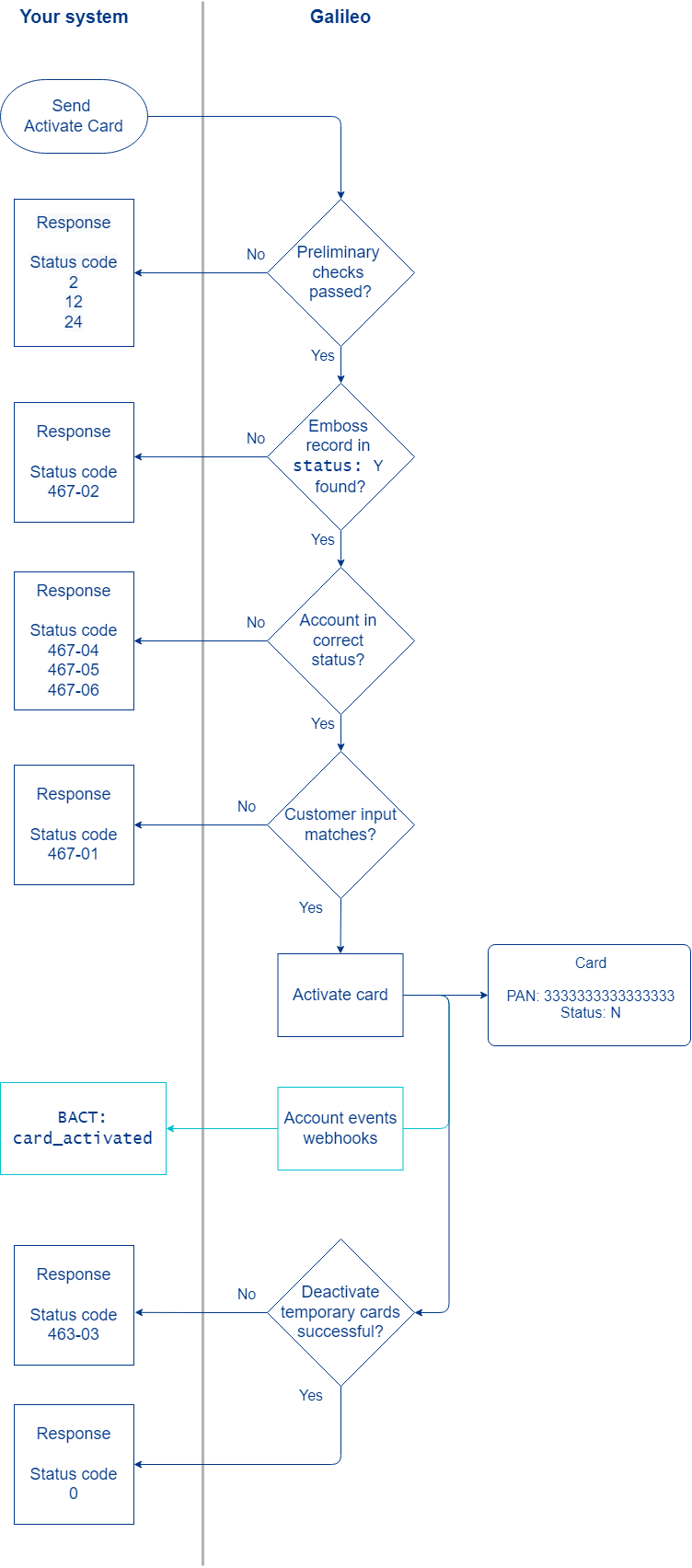
- Retrieve cardholder input, populate the Activate Card endpoint, and send.
- SoFi Tech Solutions performs a number of preliminary checks. Failures return the status codes shown in the diagram. Consult the Status codes table for next steps.
- SoFi Tech Solutions checks for a card with the
accountNothat has an emboss record instatus: Y. Failure to find such an emboss record returnsstatus_code: 467-02. - SoFi Tech Solutions verifies that the card's account is not in an improper status:
- If it is in a status that is specified in the CRDBL parameter, the endpoint returns
status_code: 467-06. - If it is in
status: F(fraud), the endpoint returnsstatus_code: 467-05. - If it is in
status: R(charged off), the endpoint returnsstatus_code: 467-04.
- If it is in a status that is specified in the CRDBL parameter, the endpoint returns
- If the data the customer supplied matches the data on record, SoFi Tech Solutions activates the card and sends the event message
BACT: card_activated, if you are configured to receive it. If there is no match, the endpoint returnsstatus_code: 467-01. - If
deactivateTemporaryCards: 1, SoFi Tech Solutions attempts to deactivate any temporary cards that were issued. If SoFi Tech Solutions cannot deactivate the cards, the endpoint returnsstatus_code: 467-03. If the cards are successfully deactivated ordeactivateTemporaryCardsis not set, the endpoint returnsstatus_code: 0.
Sample endpoint request and response
Consult the Activate Card endpoint to see how to build the API request and to see the response schema.
Status codes
Consult Activate Card to see status codes and next steps.
View the activated card
Call the Get Card or Get Account Cards endpoint and check card_status.
SoFi Tech Solutions setup
These product/program parameters affect card-activation behavior. SoFi Tech Solutions sets these parameters according to your use case.
| Parameter | Description |
|---|---|
| CANCS | Used in conjunction with CANOC, it specifies the status that a card must be in to be canceled when a new card is activated. Default: N,X,Y,W |
| CANOC | When this parameter is set and the new card (new PAN) is activated, other cards in the statuses specified in CANCS and belonging to the same cardholder are canceled (status: C):Y — Cancel all cards regardless of prod_id.Prod — Cancel only the cards with the same prod_id.When this parameter is not set, other active cards are not canceled. |
| CRDBL | Contains statuses of cards that should not be activated. |
| TEMPC | Cancels temporary instant-issue cards when the personalized card is activated. The instant-issue card and the personalized card must have the same balance ID but different product IDs. Set this parameter on the instant-issue product. |
Updated 6 days ago