

Buy Now, Pay Later: Pre-Purchase Workflows
AvailabilityWe are currently making significant improvements to our Buy Now, Pay Later products. During this period, we are pausing new implementations. We will resume accepting new implementations in late 2026.
The guide describes the endpoints and workflows for creating and managing Buy Now, Pay Later: Post-Purchase loan or plan.
Endpoints related to Buy Now, Pay Later: Post-Purchase
This table lists the actions for both credit and debit transactions and the related Program API and Loan API endpoints.
| Action | Endpoints |
|---|---|
| Create a plan/loan from one or multiple eligible settled transactions in a debit or credit account. | Create Loan From Transaction |
| Create a payment on a single loan, either from a primary or external account. | Create Loan Payment |
| Create a payment on the loan, either from a primary (SoFi Tech Solutions DDA) or an external account. | Create Adjustment |
| Check the payments made to date on the loan and receive an update schedule of future payments required. | Get Loan Payment Schedule |
| View individual installment status across all installments. | Get Loan Installment Statuses |
| Charge off an account. | Update Loan Status |
| Check the status of the loan, such as the current balance, loan cycle, and the remaining payments. | Get Loan Status |
How it works
This section contains workflows that illustrate the processes for creating and managing a Buy Now, Pay Later: Post-Purchase service.
Loan creation
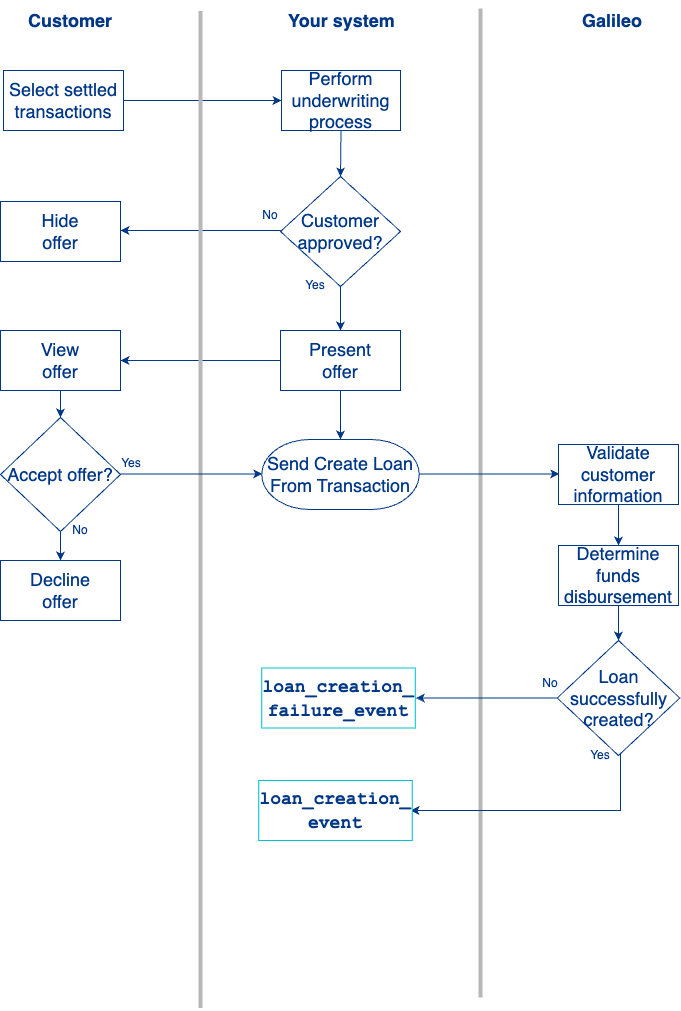
- Your customer reviews recent settled transactions and selects up to five transactions to move into a post-purchase BNPL loan/plan.
- You perform the underwriting to determine the offer you want to extend to the customer.
- You present the offer to your customer.
- The customer accepts the offer and terms of the loan.
- You use the Posted Transactions RDF to determine the settlement key for each transaction.
- You call Create Loan From Transaction endpoint to create a loan for the sum total of the selected transactions and any fees associated with the BNPL: Post-Purchase offering and specify if funds are disbursed to a SoFi Tech Solutions DDA or an external account. See Creating a Loan from Transactions for details.
- SoFi Tech Solutions validates the following details:
- The selected transactions are not part of an existing installment loan.
- You have the required information about the customer.
- The selected transactions are settled.
- SoFi Tech Solutions creates the loan and sends confirmation of successful loan creation in the Create Loan From Transaction response.
- SoFi Tech Solutions also notifies you the loan was successfully created via the
loan_creation_event.
Manage payments and charge off
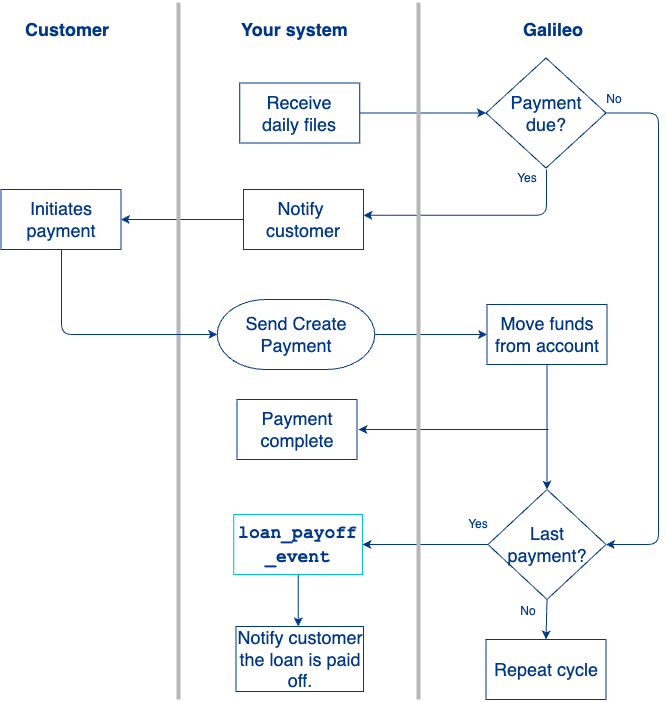
The customer pays the BNPL: Post-Purchase in installments at the defined schedule in the offer.
- You use the Daily Loan Status, Daily Loan Installment Status, and Daily Transaction files to track when a customer's next payment is due.
- You can also call theGet Loan Status endpoint or Get Loan Installment Statuses endpoint to get loan statuses for customers.
- The customer receives the notification and initiates the payment.
- When a payment is due, you call the Create Loan Payment endpoint to execute the payment.
- SoFi Tech Solutions sends the Create Loan Payment response in confirmation of a successful payment.
- Repeat steps 1–5 for the remaining installments.
- On the last payment, you receive a notification from SoFi Tech Solutions that the loan/plan is paid off (
loan_payoff_event). - You notify the customer that the loan is paid off and closed.
Updated 6 days ago
Did this page help you?