

About Identifiers
The SoFi Tech Solutions system generates identifiers for multiple actions and items: customers, accounts, cards, transactions. This guide explains the various types of identifiers that SoFi Tech Solutions uses and how to track them across systems. You will learn about these characteristics of identifiers:
- What they identify
- Their level of uniqueness
- Where to see them
For quick reference, see these two diagrams:
- Table relationships — How the customer, account, balance, and card tables relate to each other.
- Identifier relationships — Example showing two customers who open various accounts, some that share balances, and some that have cards with multiple emboss records
What they identify
Most identifiers that SoFi Tech Solutions generates are integers that point to a row in a table. Such an identifier is called a "primary key" in database terms. Because your data is organized into multiple tables, each row (record) has a primary key that uniquely identifies it within that table.
Level of uniqueness
One important characteristic of an identifier is the "realm" or area across which it is unique. For example, a driver license number is unique within the state that issued the license, but that means it's possible for a driver license number in one state to be the same as the number from another state. If you were maintaining a database of driver license numbers from multiple states, and you wanted to create a unique identifier for each entry, you could add something to the license number, such as the two-letter state abbreviation, to ensure that all identifiers are unique.
The identifiers that you will be using in the SoFi Tech Solutions system are unique across different realms, as shown in this table. The rest of this guide contains detailed explanations of most of these identifiers.
| Realm | Description | Examples |
|---|---|---|
| World | Only one identifier of its type exists. | PAN, any UUID |
| Nation | The identifier is unique within a nation. | SSN, SIN, passport ID |
| State or province | The identifier is unique within the governmental jurisdiction | Driver license number |
| SoFi Tech Solutions | The identifier is unique across the entire SoFi Tech Solutions platform. | Provider ID, program ID, PRN, product ID |
| Core | SoFi Tech Solutions sets up a computer core for you that is isolated from all other client cores. The core contains all of your data. Most clients need only one core. | Card ID, balance ID |
| Transaction type | Each type of transaction is input into a separate table with its own numbering. There is one table of each transaction type per core. | Authorization ID, payment ID, adjustment ID |
Where to see identifiers
You can see the various identifiers in these resources:
- Program API and other inbound APIs
- Events API
- Auth API
- External Trans API
- Customer Service Tool (CST)
- Raw data files (RDFs)
Identifier types
This section describes several fundamental identifier types:
Your IDs
When you sign on as a SoFi Tech Solutions client, we generate several identifiers that distinguish you and your data from our other clients.
If you are using the Program API or other inbound APIs, SoFi Tech Solutions assigns you a provider ID that you include with all of your API calls. This ID is unique across SoFi Tech Solutions.
During initial setup, you create one or more programs. A program is a grouping of products that belong to the same category. For example, if you are offering several DDAs with overdraft, the DDA products are in one program and the overdraft is in another. Within the DDA programs you might offer different products, such as two cards that represent different transaction limits, or a DDA and a savings account. For each program you are assigned a program ID, and each product has a product ID. Both of these identifiers are unique across our platform. The product ID is sometimes called a PID. See Partners, Programs, and Products for details.
The program ID is present in every record of the Base RDFs as UNIQUE PROGRAM ID as well as in Events API messages as prog_id.
You will use the product ID every time you create an account with the Program API (prodId), and the prod_id is present in every Events API message as well as in some Program API responses.
The submitter ID is a specialized ID that you use only when accessing non-API resources with an HTTP call, such as during some PIN-set procedures. The submitter_id is your provider ID plus a hyphen plus a four-digit number that we generate: 32554-3278.
Your ID usage
Consult this table to see how your IDs are represented across the SoFi Tech Solutions platform.
| Incoming APIs | Events API | Auth API | Base RDF | CST |
|---|---|---|---|---|
providerId | — | — | — | — |
prog_id | prog_id | — | UNIQUE PROGRAM ID | — |
prodIdprod_id | prod_id | — | PRODUCT ID | Card Description |
Customer IDs
When you call an enrollment endpoint such as Create Account or Start Enrollment, or you create a new customer in the CST, SoFi Tech Solutions creates a record in the clients table. Each record has a client ID that is unique to your core. (Customers are called "clients" in SoFi Tech Solutions back-end code.)
The client_id is not returned by Program API endpoints; instead, you receive a payment reference number (PRN) that is associated with the account. As desired, you can add the client_id to some Events API webhook payloads, and you can request that it be added to your RDFs. This field is also called CID in the CST.
Customers may also be identified by the id field, which contains an identifier that the customer supplies for KYC/CIP, such as a Social Security or passport number. You input the id with enrollment endpoints. These IDs are typically generated by a government agency and are unique within that agency's jurisdiction. Go to Using the id and idType parameters in the Customer ID Verification (KYC/CIP) guide for more information. You can use id plus idType to retrieve information on a specific customer using the Get Account by ID endpoint.
If you are using SoFi Tech Solutions's integrated KYC/CIP processes, calling an enrollment endpoint also creates a record in the applications table with an app_id. This value is returned as appId by the Start Enrollment endpoint and as app_trans_id by the Verify Enrollment endpoint.
Customer ID usage
Consult this table to see how customer IDs are represented across our system.
| Program API | Events API | Auth API | Base RDF | CST |
|---|---|---|---|---|
| — | client_id* | — | GALILEO CLIENT ID | CID |
id | — | — | ID | ID 1 |
appIdapp_trans_id | — | — | — | — |
* Field enabled by request
Account IDs
When you create an account using an account-creation endpoint such as Create Account or Add Account, or create an account with the CST, SoFi Tech Solutions creates a record in the accounts table. Each record has an XID and a PRN.
The XID is the primary key of the accounts table, and it is unique per program ID. You can see the XID in the CST, the Auth API, and some Product and Service RDFs. You might also use the XID when troubleshooting with us. The XID is not often returned by the Program API or Events API. There is a one-to-one relationship between the XID and the PRN.
The PRN (payment reference number) is a system-generated 12-digit account identifier that comprises three parts:
- 3-digit prefix
- 8-digit account number, which in new programs begins with 101 and increments to 102 etc. when the five remaining digits are exhausted
- 1-digit checksum
For each program that you create, SoFi Tech Solutions generates a three-digit PRN prefix that is unique across SoFi Tech Solutions. Your bank must approve this prefix, because the bank uses the number to parse Nacha files and perform internal reconciliation. This number is the "bank account number" such as you would get for any bank account. Because this number can be transacted on, you should expose this number only to the account holder.
The PRN is the number that you can use to specify a customer account in the accountNo parameter of the APIs.
SoFi Tech Solutions also maintains a separate balances table for account balances, giving every entry a balance_id (also called a galileo_account_number or BID) that is unique to your core. These balances represent an actual bank account that an account transacts on. The balances are separate from the accounts so that multiple accounts can transact on the same balance. See Joint accounts and shared balances in the About Accounts guide for more information.
The external account ID is a value that you can provide when creating or updating an account. This identifier is not linked to any table on our platform—the value exists for your own purposes. For example, you can use this parameter in cooperation with your card embosser to dynamically select card art, or you can input customer identifiers for your own back-end systems. Consult with SoFi Tech Solutions for other ways to use this field. You can view this field in the response to the Verify Account endpoint, and it is provided in the Customer Master RDF. Do not pass this number for primaryAccount or accountNo in any API request.
External account numbers
An ACH account points to an external bank account that can be used for such transactions as interbank transfers. An ACH account is set up using the Add ACH Account endpoint. See ACH Tracking and Troubleshooting for more information on ACH identifiers.
A Destination account also points to an external bank account, but this account is used to receive wires. A Destination account is set up using the Create Destination Account endpoint.
Account ID usage
Consult this table to see how account IDs are represented across the SoFi Tech Solutions platform.
| Program API | Events API | Auth API | Base RDF | CST |
|---|---|---|---|---|
pmt_ref_no | pmt_ref_no | prn | PRN | Payment Reference Number |
galileo_account_number | balance_id | — | GALILEO ACCOUNT ID | BID |
externalAccountIdexternal_account_id | extid | — | EXTERNAL ACCOUNT ID | External Account ID |
Card IDs
When you create a card account using the CST or using endpoints such as Create Account or Add Account, SoFi Tech Solutions creates an entry in the cards table. Each entry has a card_id (also called the CAD) which is the primary key for the cards table and is unique to your core. In each entry is the card's PAN (primary account number), which is unique in all the world. The first 6–8 digits of the PAN (depending on the network) are the BIN (bank ID number), which is assigned by your bank.
Because the PAN is the number used to transact on a card, the number falls under PCI compliance rules. If you are not PCI compliant, you cannot receive the full PAN from SoFi Tech Solutions such as in Inbound API responses, RDFs or the CST. Instead, you receive a masked PAN, which shows the first six digits and the last four digits of the PAN, with the rest masked, for example, 554885XXXXXX0988.
There is a one-to-one relationship between a PAN and a CAD, so you can use the CAD in the SoFi Tech Solutions system to specify a card instead of using the PAN. When calling Inbound API endpoints that reference cards, it is usually preferable to use the CAD for accountNo so that oGnly the referenced card is affected. (When you use the PRN for accountNo and there are multiple active cards associated with the PRN, you may get an error.)
If you need to replace a card with a new PAN, a new record is created in the cards table with a new card_id. If on the other hand you reissue the card with the same PAN, a new entry is not created in the cards table; instead, a new entry is created in the emboss table. See Reissuing vs replacing in the Reissuing Cards guide for more information about the difference between reissuing and replacing.
Each entry in the emboss table represents a time that a physical card order was sent to the embosser. The first entry in the emboss table is created when the card is first issued and sent to the embosser. Every time an emboss order is sent to the embosser, a new entry is created in the emboss table. Every entry in the emboss table has a new expiry date and new CVV. There is a 1:1 relationship between the expiry date and the CVV — when you generate a new expiry, you also generate a new CVV. When you retrieve card records with the Get Account Cards or Get Card endpoint, you get a nested list of emboss records for each card.
Each entry in the emboss table has an emboss_uuid, which uniquely identifies the emboss record. The emboss_uuid is not a primary key in the emboss table but is a UUID, which means that it is generated using an algorithm and is therefore unique in all the world. A UUID has this format: 123e4567-e89b-12d3-a456-426614174000. UUIDs are not generated in sequence, so to know which emboss_uuid represents the most recent emboss record, look for the new_emboss_uuid field. For example, if you call Get Card, the response_data will look like this for a card that has been reissued once. You can see that new_emboss_id is 123e4567-e89b-12d3-a456-426614174000, which means that the second emboss record is the most recent:
    "response_data": {
        "card_number": "525691XXXXXX6388",
        "new_emboss_uuid": "123e4567-e89b-12d3-a456-426614174000",
        "expiry_date": "2028-12-25",
        "card_security_code": "123",
        "status": "N",
        "card_id": "4444",
        "embossed_cards": [
            {
                "status": "N",
                "created_date": "2022-01-25",
                "emboss_uuid": "543e21a1-e89b-12d3-a456-426614174999",
                "emboss_date": "2022-01-25",
                "expiry_date": "2026-12-25",
                "shipping_type": "standard",
                "product_id": "3333"
            },
            {
                "status": "Y",
                "created_date": "2022-06-07",
                "emboss_uuid": "123e4567-e89b-12d3-a456-426614174000",
                "emboss_date": "2022-06-07",
                "expiry_date": "2027-05-07",
                "shipping_type": "standard",
                "product_id": "3333"
            }
        ]
    }
Open these Recipes to see more examples of endpoint responses with card/account/emboss relationships:
Card ID usage
Consult this table to see how card IDs are represented across the SoFi Tech Solutions platform.
| Program API | Events API | Auth API | RDF | CST |
|---|---|---|---|---|
card_id | cad | cad | CARD ID | CAD |
card_number | protected_pan_four* | pan | CARD NUMBER | PAN |
emboss_uuid | — | — | —- | —- |
* Last four digits only.
Transaction IDs
See Transaction IDs for explanations and examples.
Identifier relationships
The diagrams below demonstrate the relationships between the different types of identifiers.
Table relationships
This diagram shows the relationships between the tables described above. The shaded fields are the primary keys in each table.
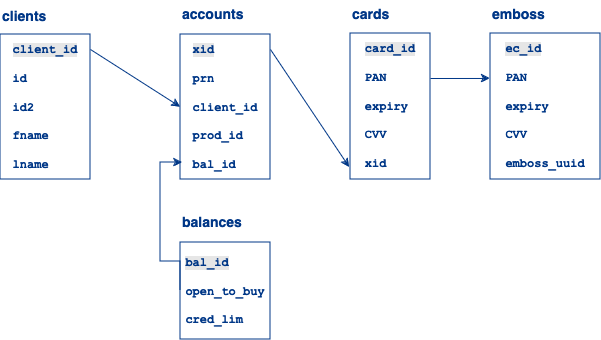
The arrows in the diagram show one-to-many relationships, meaning:
- A client can be associated with multiple accounts.
- A balance can be associated with multiple accounts.
- An account can be associated with multiple cards.
- A card can be associated with multiple emboss records.
Identifier relationships
The diagram below shows the relationships between cardholders, their accounts, balances, cards, and emboss records.
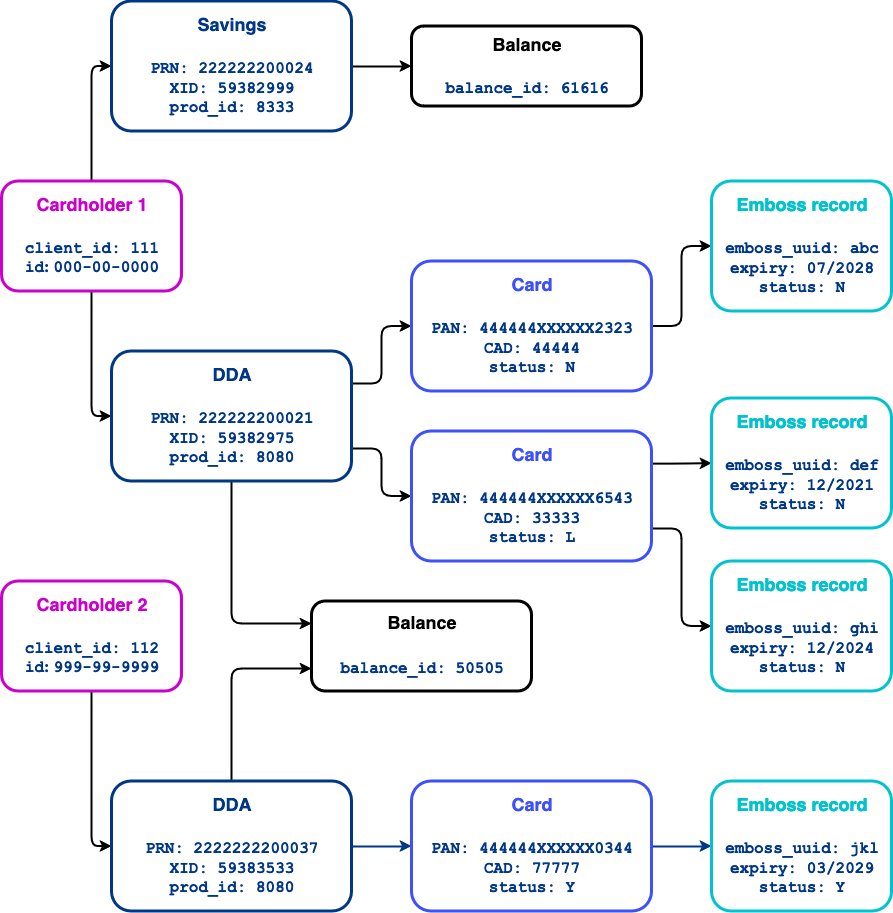
- Cardholder 1 opens two accounts:
- DDA/Checking account
- PRN:
222222200021 - XID:
59382975 prod_id: 8080balance_id: 50505
- PRN:
- Savings account
- PRN:
222222200024 - XID:
59382999 prod_id: 8333balance_id: 61616
- PRN:
- DDA/Checking account
- Each account has its own PRN/XID, a
prod_idthat corresponds to the account type, and a differentbalance_id. - The DDA account has a physical card. The card has its own PAN/CAD. The card inherits the PRN/XID,
balance_id, and theprod_idfrom the DDA. - The first card issued has these characteristics:
- PAN:
444444XXXXXX6543 - CAD:
33333 - Expiry:
12/2021 - CVV:
484 emboss_uuid: def
- PAN:
- When that card expires, it is reissued. The PAN/CAD are the same, but the expiry date/CVV are new.
- PAN:
444444XXXXXX6543 - CAD:
33333 - Expiry:
12/2024 - CVV:
191 emboss_uuid: ghi
- PAN:
- Then the first card is reported lost, so it is deactivated and replaced by a new card. The PAN/CAD are new and the expiry/CVV are new.
- PAN:
444444XXXXXX2323 - CAD:
88888 - Expiry:
07/2028 - CVV:
595 emboss_uuid: abc
- PAN:
- In total, three physical cards are embossed for this XID/PRN, so there are three emboss records. Only the last card is active (
status: N). - A relative (spouse or child) of Cardholder 1 signs up for the same DDA product as Cardholder 1. This account shares a balance with Cardholder 1's DDA, meaning that both accounts transact on the same balance.
- PRN:
2222222200037 - XID:
59383533 prod_id: 8080balance_id: 61616
- PRN:
- The card issued to Cardholder 2 is new, and so it is in
status: Y, meaning that it has not yet been sent to the embosser.- PAN:
444444XXXXXX0344 - CAD:
77777 - Expiry:
03/2029 - CVV:
343 emboss_uuid: jkl
- PAN:
Testing identifier relationships
To create the scenario in the above diagram, follow these steps in your CV core. You will need SoFi Tech Solutions to set up a prod_id for a physical card account and a prod_id for a savings account in CV. Also verify with SoFi Tech Solutions that the emboss process is running in your core.
- For Customer 1, follow the steps in One customer with multiple secondary accounts in About Accounts, but omit the overdraft account.
- To activate the card, follow the steps in Verify card creation and Activate the card in Setup for Card Transaction Simulation.
- To reissue the card (as if it had expired), follow the steps in Use case 1: Reissue card with same PAN and new expiry in the Reissue Cards guide.
- Repeat step 2 to activate the card.
- To report the card as lost and get a replacement, follow the steps in Lost, Stolen or Damaged Cards that are appropriate to your card type: physical, Digital First, or virtual.
- Repeat step 2 to activate the card.
- Call Get Account Cards to retrieve the card and emboss records. In the response, the card and emboss records should be nested to match the diagram above.
- For Customer 2, follow the steps in Two customers, one product in About Accounts.
- Follow the steps in Verify card creation until the card's emboss record is created.
- Call Get Account Cards with these parameters:
accountNo— The PRN for Customer 2's DDAincludeRelated— Pass1
The endpoint should return the account, card, and emboss records for both customers, and the nesting should match the above diagram.
Updated about 1 month ago